
Sphere Las Vegas Map & Seating Guide
Understand the Sphere’s layout, levels, and seating so you can choose the right section. We reference official venue maps—for the latest, visit thesphere.com.
Below is a representation of the venue’s general seating layout. For official, up-to-date Sphere Las Vegas map and level details, see thesphere.com (Plan Your Visit → Maps).
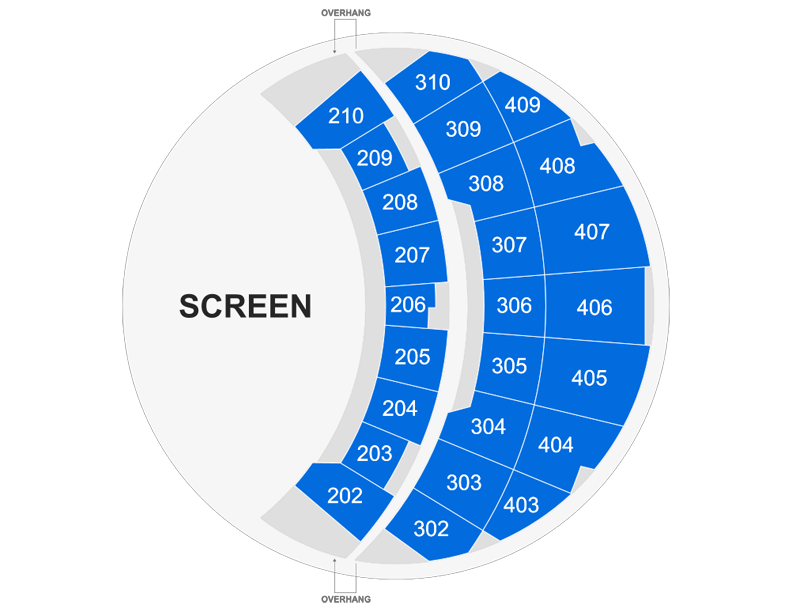
Why the Sphere Las Vegas Map Matters
The MSG Sphere is a sphere-shaped venue with a giant interior screen and tiered seating. Where you sit affects your view, your comfort, and often the price you pay. Using a Sphere Las Vegas map—whether the official one on thesphere.com or our guide here—helps you understand the layout before you buy tickets. This page summarizes the venue’s levels and sections based on publicly available and official information. For the definitive Sphere Las Vegas map and any updates, the venue’s “Plan Your Visit” and “Maps” pages are the source.
Venue Overview: Screen and Seating
The main visual focus inside the Sphere is the dome screen (often referred to as the “exosphere” or interior display) that wraps around the audience. Seating is arranged in tiers facing this display. According to the official Sphere website, the venue has multiple levels: an Event Level (E), Main Level (2), Lower Level (3), Terrace Level (4), Upper Suites Level (5), Lower Gallery Level (6), and Upper Gallery Level (7). Parking and entrances are documented on the official “Parking & Entrances” map. Exact section numbers and capacity per level can be confirmed on thesphere.com.
Event Level (E) and Main Level (2)
These levels are typically closest to the action and the screen. The Event Level (E) is the floor level; the Main Level (2) sits just above it. Seats here often command premium prices and offer the most immersive sightlines because you’re surrounded by the dome. If you prefer to feel “inside” the show rather than looking down at the screen, these sections are usually the best fit. The official Sphere Las Vegas map on the venue site shows the exact section numbers and layout for each level.
Lower Level (3) and Terrace Level (4)
Mid-tier seating provides a balance of proximity and a slightly elevated view. The Lower Level (3) and Terrace Level (4) are often a good compromise between price and view. You’re still close enough to feel immersed but may have a broader view of the full dome. Check the Sphere Las Vegas map for section numbers and whether any rows are under an overhang that could affect sightlines—the venue’s own maps sometimes indicate overhang areas.
Upper Levels: Suites and Gallery (5, 6, 7)
Levels 5 (Upper Suites Level), 6 (Lower Gallery Level), and 7 (Upper Gallery Level) are higher in the bowl. Suite levels may offer private or semi-private seating and amenities; gallery levels are usually standard seating with a more top-down view of the screen. Some guests prefer these for a “big picture” view of the immersive content. The official Sphere Las Vegas map shows which sections are on each level so you can compare when buying tickets.
Overhang and Sightlines
In many arenas, upper decks create an overhang that can limit the view for certain rows. The Sphere’s geometry is unique, but it’s still worth checking whether your chosen section has any obstructions. The venue’s official maps and seating charts sometimes mark overhang areas. When booking through an authorized seller, look for notes about “limited view” or “obstructed view” if you want to avoid those seats. Our diagram on this page is illustrative; for precise overhang and section details, use the Sphere Las Vegas map on thesphere.com.
Parking and Entrances on the Sphere Map
The Sphere is at 255 Sands Avenue, Las Vegas. The official website publishes a “Parking & Entrances” map showing where to park and which doors to use. Arriving with a printed or saved copy of that map (or at least knowing your entrance and level) can reduce stress on show day. We don’t reproduce the full parking map here; we recommend downloading or viewing it on thesphere.com under Plan Your Visit → Maps.
How to Use the Sphere Las Vegas Map When Booking
When you’re ready to buy tickets, use the section and level names (or numbers) from the official Sphere Las Vegas map to compare options on your ticket provider’s site. Many sellers show a simple seat map or list sections by name. Matching those to the venue’s map helps you avoid surprises. If you care about being centered vs. to the side, or about avoiding overhangs, cross-reference the seller’s section with the venue’s level map.
Accessibility and Special Seating
The Sphere provides accessibility information and accessible seating options. These are typically indicated on the venue’s maps or through the box office and authorized partners. If you or someone in your party needs accessible seating, check thesphere.com and mention your needs when booking so you’re placed in an appropriate section according to the Sphere Las Vegas map and the venue’s policies.
Combining Map and Schedule for Your Visit
Use the Sphere Las Vegas schedule to pick your date and show, then use the Sphere Las Vegas map to choose your section. For immersive experiences like The Wizard of Oz, seating can significantly affect how “inside” the story you feel. Spending a few minutes with the map before you buy can make your visit more enjoyable.
Where to Get the Official Sphere Las Vegas Map
The definitive Sphere Las Vegas map—including Parking & Entrances, Event Level, Main Level, Lower Level, Terrace Level, Upper Suites, and Gallery levels—is on the official Sphere website. Go to thesphere.com, then Plan Your Visit → Maps (or the equivalent section). There you’ll find the current, detailed maps for each level. We summarize the structure here for your convenience, but we are not the venue; when we cite level names and general layout, we’re describing what’s published on the official site.
Section Numbering and Finding Your Seat
On the official Sphere Las Vegas map, sections are usually numbered by level (e.g., 200s, 300s, 400s on a typical seating chart). Your ticket will show a section, row, and seat number. Use the venue’s level map to see where that section sits relative to the screen and to overhangs. If you’re unsure, the venue’s guest services or your ticket provider can often clarify. Having the Sphere Las Vegas map open when you purchase helps you visualize your choice.
Price Tiers and Map Sections
Generally, seats closer to the screen and on lower levels cost more; higher and farther sections are often more affordable. The exact pricing is set by the venue and its partners, not by this guide. When you search for tickets, you’ll see sections and price ranges. Cross-referencing those with the Sphere Las Vegas map lets you decide whether a given price is worth the section’s location for your preferences.
Summary: Your Map and Seating Checklist
Review the Sphere Las Vegas map on thesphere.com to see levels and sections. Decide whether you prefer floor/main levels for maximum immersion or upper levels for a broader view. Check for overhang or obstructed-view notes when booking. Use our home page or the widget on this page to check availability and book tickets. Then enjoy the show with the confidence that you chose the right part of the venue.
Check availability and book Sphere experiences
View tickets